
No dead ends, only solutions

Case Study
Custom Sweatshirt Personalisation Website

Context
UX design project completed as part of the Google UX Design Certificate:
“Design a flow for ordering customised sweatshirts.”
Project Overview

The Project:
As part of the Sharpen brief, “Design a flow for ordering customised sweatshirts,” I created Sweet Sweat — a website that allows users to design and order personalised sweatshirts in a simple and intuitive way.
The platform offers:
-
A guided personalisation flow
-
Real-time visual preview
-
Creative suggestions
-
AI-assisted design support

Project duration:
November – December 2024

The problem:
Customising a garment online can be:
-
Complex
-
Time-consuming
-
Unintuitive
Users want to:
-
Create a sweatshirt quickly
-
Easily visualise the final result
-
Achieve an original outcome without excessive effort


Screenshots from the beginning and end of the user flow are shown above.

My role:
As the sole UX designer on this project, I assumed a generalist role covering multiple responsibilities.

Responsibilities:

The goal:
Design a website that enables users to:
-
Personalise a sweatshirt through a few clear steps
-
Instantly preview modifications
-
Simplify the checkout process

Here are some of the responsibilities I handled:
-
User research
-
Competitive audit
-
Information architecture
-
Visual design
-
Wireframing
-
Usability testing
-
Prototyping

Understanding the user
-
User research
-
Brainstorming ideas
-
Competitive audit
-
Personas
-
Problem statements
-
User journey map
-
User task and user flow steps
-
« Close-up » storyboard
-
« Overview » storyboard
Research: Summary

There were four main steps:
-
User research: Through interviews and empathy maps, the research helped identify the needs of users who
wanted to quickly personalize sweatshirts with a creative, original, and aesthetically pleasing result. -
Competitive audit: We analyzed the strengths and weaknesses of four competitors and identified gaps.
-
Usability testing: Conducted at the lo-fi prototype stage.
-
A second test: With the same users.

User Research: Summary
After a brainstorming session, we conducted interviews and empathy maps to understand the future users of our
website and their needs.
Our research identified the primary user group as people aged 18 to 35 who want to personalize clothing online.
We took into account that some users had already personalized sweatshirts online, while others had never done so
before.
3 out of 5 users had previously personalized and purchased sweatshirts online.
This research revealed additional needs, but we chose to focus specifically on AI-assisted personalization.
User Research: User Pain Points
1
Create an original sweatshirteasily
Users need to create and personalize sweatshirts quickly and effortlessly. However, creating an original and visually appealing design can be
challenging.
2
Customization
Users should not only be able to generate a design, but also customize the sweatshirt’s
characteristics.
3
Quick ordering
One of the challenges was to beable to create and place an orderquickly.
The entire user flow needs to be fast and easy, ensuring the user doesn’t get stuck at any step especially during the ordering process.
Brainstormed Ideas
-
AI generates a design based on a description provided by the user
-
Ability to choose between diff erent font styles and designs
-
Option to hand-draw or upload one’s own creations, and even enhance them with AI
-
Automatic adjustment of the design or text to fi t the sweatshirt size
-
Recommendations based on user preferences
-
AI can generate slogans
-
AI can adapt ideas based on current fashion trends or past styles
-
Ability to publish a design on social media
-
Voting system or peer advice on designs
-
Gift packaging customization
-
Design contest with voting, winner receives their sweatshirt for free
Competitive Audit
-
Objective: Compare the user experience of each competing website

Persona: Clara A.
Problem Statement:
Clara is a loving and creative young woman, but she hesitates when it comes to choosing a personalized gift forher boyfriend. She needs a simple and inspiring website to personalize a sweatshirt for him because she lackscreative ideas. She wants the process to be fast and easy.
User Story:
As a young woman looking for a gift for my boyfriend, I want to be able to quickly personalize a sweatshirt withan original result so I can give him a unique, stylish, and aff ordable gift that will make him happy.

Persona: Amadou D.
Problem Statement:
Amadou is looking for a simple and quick way to create personalized sweatshirts and sell them through his online shop.
He finds current platforms too complex or limited in personalization options and lacks tools to easily preview the final product.
User Story:
As a young entrepreneur passionate about streetwear and the automotive world, I want to be able to easily create and sell custom sweatshirts with original and professional designs to grow my brand without managing production and logistics.

User Journey Map: Persona: Clara A.

Objective: I want to offer him a personalized sweatshirt that shows I care about his geek culture.

User task and user flow steps
User Task: Use the website to personalize a sweatshirt using artifi cial intelligence.
User flow steps from entry point to task completion within the app:
1. Visit the website
2. Homepage
3. Navigate to Create with Artifi cial Intelligence
4. Enter keywords that match your expectations into the AI dialog box
5. Modify the size of one of the graphic designs on the front of the sweatshirt
6. Confi rm the sweatshirt personalization
7. Click Add to Cart and complete the checkout process
« Close-up » storyboard
Scenario: Clara, a loving and creative young woman, is looking for a simple and inspiring website to personalize a sweatshirt for her boyfriend. Lacking ideas, she wants a tool that is quick and intuitive.

« Overview » storyboard

Starting the Design
-
Paper wireframes
-
Digital wireframes
-
Low-fi delity prototype
-
Usability study
Paper Wireframes
Here are various iterations of the homepage with screen size variations including desktop, mobile, and tablet formats. Due to time constraints, not every screen was sketched on paper. Iterations were done digitally after each design critique session.

1
5
6
8
7
13
10

6
8
7
9
1
2
3
4
5
15
14
13
11
12

1
2
5
15
14
13
10
Key Elements: 1 Tutorial ; 2 Create ; 3 Create with AI ; 4 Create with a stylist ; 5 Themes and ideas ; 6 Menu ; 7 Account ; 8 Language ; 9 Cart ; 10 FAQ ; 11 About ; 12 Shipping and returns ; 13 Social media; ; 14 Featured carousel ; 15 Other highlights
Digital Wireframes
It was important for users to have access to different sweatshirt creation methods and to easily find design ideas.
Since then, the website design has continued to evolve.

Users will be able to create sweatshirt designs easily thanks to artificial intelligence.
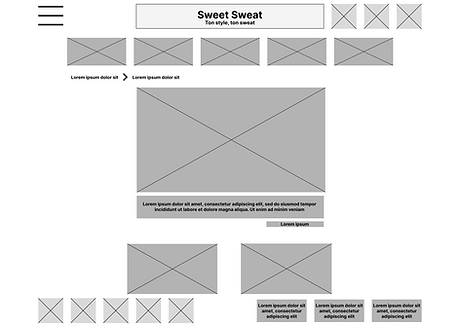
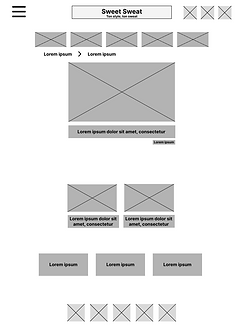
Digital Wireframes
Digital mockup of the "Create with AI" page in different screen sizes (Web, tablet, and smartphone) before the first test.

Low-Fidelity Prototype
Here is the link to this low-fi delity prototype. It’s the version used for the fi rst user test.
We invited users to focus on generating a sweatshirt design using AI and to complete the ordering process.

Usability Study: Settings

Type of study:
Unmoderated usability study

Participants :
5 participants

Location:
Istanbul, remote

Duration:
15 to 20 minutes
Usability Study: Results
I conducted two rounds of unmoderated usability testing with 5 participants (3 women and 2 men aged 18 to
35). Our goal was to determine whether the core user experience, creating, customizing, and ordering a
sweatshirt was easy for users to accomplish.
Key performance indicators were Time spent fully customizing a sweatshirt using AI, Conversion rate,
System usability scale, User satisfaction
1
Saving in a library
Users couldn’t save their
customized sweatshirts to a
personal library.
2
Modify payment and shipping
information
Users encountered difficulties
during checkout, especially with
entering payment and shipping
information.
3
Signal announcing price change
Users encountered difficulties
during checkout, especially with
entering payment and shipping
information.
Refining the Design
-
Design system
-
Mockups
-
High-Fidelity Prototype
-
Accessibility
Design system

Mockups
Users are now notified with a message when the price of their product changes.
Before the usability study

After the usability study

Mockups
Users can now add and edit their delivery address and payment method more easily. They can also complete their purchase without saving their payment card details.
Before the usability study

After the usability study

Key Mockups
Users can now more easily add and edit their shipping address and payment method. They can also pay without
saving their card details.


High-Fidelity Prototype
Here is the link to the high-fidelity prototype. It only includes the main user flow!

Accessibility Considerations
1
The font family used is Sans Serif,
which makes reading easier for
people with reading difficulties
such as dyslexia.
We also paid attention to font
choices and text styling.
2
The colors of texts, backgrounds,
buttons, etc., were chosen to
enhance emphasis.
This improves visibility for users
with visual impairments and
facilitates the user flow.
3
The chosen hierarchy will
eventually support screen readers
like TalkBack, which will be
useful for users with visual
impairments.
Conception responsive
-
Information Architecture
-
Responsive Layout Design
Site Map
Here is the initial site map. It has since evolved slightly.

Responsive Design:
The designs covered variations for mobile, tablet, and desktop screen sizes.
I moved the main menus downward to prioritize and highlight sweatshirt design proposals to inspire and encourage users to create their own.
Desktop

Tablet

Mobile Website

Going Forward
-
Key Takeaways
-
Next Steps
Key Takeaways

Impact :
The design aims to meet user needs, specifi cally the need to create and personalize sweatshirts.
Peer feedback excerpt:
"Using artificial intelligence makes it easy to create, and lets you generate designs again and again."

What I Learned:
While designing this website, we learned that research activities like usability testing and design critiques helped us overcome biases, broaden our perspective, and continuously improve the design through iteration.
Next Steps
1
Allow users to share their reviewsand creations both on the platform and via social media, and plan additional usability testing to improve the experience
2
Develop additional creation options, such as stylist-assisted customization.
3
Improve the app’s accessibility for users with disabilities.


