
No dead ends, only solutions

Case Study

Application and Website Supporting Women in Situations of Danger or Precarity
Context
Project completed as part of the Google UX Design Certificate: “Design a tool to help women in situations of danger or precarity find appropriate support.”
Project Overview

The project:
Univers’elles is a mobile application and website designed to:
-
Facilitate access to support resources
-
Centralise available services
-
Reduce isolation
-
Provide an SOS feature in emergency situations
The tool aims to support users towards greater social and economic autonomy.

Project duration:
01/01/2025-12/01/2025

The problem:
In France, many women in vulnerable situations (domestic violence, social isolation, administrative barriers, etc.) face difficulties in:
-
Quickly identifying available resources
-
Accessing appropriate services
-
Requesting help safely
Access to information is often fragmented and sometimes difficult to understand.


My role:
As the sole UX designer on this project, I assumed a generalist role covering multiple responsibilities.

The objective:
Design a clear, accessible, and secure digital tool enabling:
-
Rapid access to resources
-
Simplified navigation
-
An effective SOS feature in emergency situations
The project focused particularly on optimising this key functionality to make seeking help more immediate and intuitive.

Responsibilities:
Here are some of the responsibilities I handled:
-
User research
-
Competitive audit
-
Information architecture
-
Visual design
-
Wireframing
-
Usability testing
-
Prototyping

Understanding the User
-
User research
-
Brainstorming ideas
-
Competitive audit
-
Personas
-
Problem statements
-
User journey map
-
User task and user flow steps
Research : Summary

There were four main phases:
-
User research: Through interviews and empathy maps helped us understand the needs of women in
precarious situations. -
Competitive audit: Identify the strengths and weaknesses of 3 main competitors.
-
Usability testing: Conducted during the low-fidelity prototype stage.
-
Second round of testing: Performed with the same users.

Research: Summary
After a brainstorming session, we conducted interviews and created empathy maps to better understand the
future users of our app and website, along with their needs.
After analysis, we identified our primary user group as women aged 18 to 60.
We interviewed 5 women, including one who is deaf-mute: 2 women had no children, 3 women had children
2 women were married, 3 women were employed, 1 woman was a student, 1 woman was unemployed
This research helped surface key user needs, but we decided to focus specifically on the SOS emergency feature
due to its urgency and importance.
User Research: User Pain Points
1
Sending an SOS in a single click
Users need to be able to send a distress call quickly
2
To have a website that is easy to use
In a dangerous and stressful situation, navigation must be intuitive
3
Accessing help even with a disability
Some female users face reading difficulties, language barriers, or sensory impairments.
Many support platforms do not take these user profiles into account, which can prevent them from accessing certain resources.
Brainstormed Ideas
-
Sending an SOS with one click
-
Sending an SOS without speaking (due to the situation, language, disability, etc.)
-
A discreet app to avoid alerting the abuser
-
An app that records location, ambient sound, and video
-
A website that off ers numerous resources in one place
-
Voice-activated alerts with a customizable word or phrase
-
Camoufl age display to send a discreet alert
-
Automatically notify a trusted contact at the same time as sending an SOS
-
Offl ine functionality: send alert when connection returns?
-
Pre-recorded medical and/or administrative profi le with necessary documents
-
A chat system with professionals?
Competitive Audit
-
Goal: Compare the user experience of each competing website
PDF of the comparison et PDF of the report

Persona: Jennifer D.
Problem Statement:
Jennifer is a young single mother in a precarious situation who needs help to get by and off er a better future to herson.
User Story:
As a young single mother, I want to find help and resources so I can get back on my feet and give my son a better life.

Persona: Malika M.
Problem Statement:
Malika is a married woman seeking divorce who has linguistic and administrative difficulties and needs access to legal resources to get divorced and become autonomous.
User Story:
As a mother of three who wants a divorce, I want to be supported through the process so I can become independent.

User Journey Map: Persona: Jennifer D.

Objective: To provide her son with a stable and secure future by accessing psychological, financial, and educational support, while finding an opportunity for training or employment.

User Journey Map: Persona: Malika M.
Objective: To break free from dependence on her husband by accessing resources for divorce, protecting her children, and better integrating by learning French.

User task and user flow steps
User Task: Use the app to send an SOS
User flow steps from entry point to task completion within the app:
1. Click the SOS button
2. Click on "Police"
3. Click the OK button
4. Click the STOP button
5. Click the HOME PAGE button
Starting the Design
-
Paper wireframes
-
Digital wireframes
-
Low-fi delity prototype
-
Usability study
Paper Wireframes
Here are different iterations of the homepage with variations for screen sizes, including desktop, mobile, and tablet. Due to time constraints, paper-based iterations were not created for each screen. Instead, the iterations were made digitally after each design critique session.
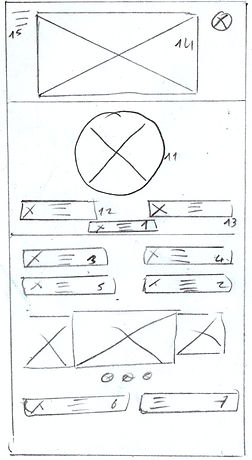
Key elements: 1 Emergency ; 2 About Us ; 3 Find Help ; 4 Online Services ;
5 Resources ; 6 Events ; 7 News ; 8 Partnerships ; 9 Private Space ; 10 Legal Notices ; 11 Emergency Call ;
12 Emergency Call ; 13 Emergency Message ; 14 Logo ; 15 Menu
Digital Wireframes for Smartphone
Users will be able to send an SOS to the police and/or an ambulance from their smartphone, tablet, or computer. The ambient sound will be recorded and sent live to emergency services along with the device's location.

Users will be able to send an SOS alert.
Digital Wireframes
Digital mockup of the "Create with Artificial Intelligence" page in different screen sizes (desktop and smartphone) before the first user test.


Low-Fidelity Prototype
Here is the link to the lo-fi prototype. It’s the version used in the first user test.
Please focus on the SOS feature.

Usability Study: Settings

Type of study:
Unmoderated usability study

Participants :
5 participants

Location:
Istanbul, remote

Duration:
15 à 20 minutes
Usability Study: Results
I conducted two rounds of unmoderated usability studies with 5 participants. We wanted to evaluate the main functionality of this application, which is the SOS feature. We aim to improve this tool to make the emergency call as effective as possible.
Key performance indicators were Time to send an SOS, Conversion rate, System Usability Scale (SUS) score, User satisfaction
1
Rework the "Police / Ambulance"button
Users did not understand the
"Police / Ambulance ".
2
Rethink the term “Validate”
The term “Validate” for sending the SOS did not seem relevant.
3
Rethink the “Cancel SOS” button
Users were confused by the use of an X icon for the "Cancel SOS" button.
Refining the Design
-
Design system
-
Mockups
-
High-Fidelity Prototype
-
Accessibility
Design system

Mockups
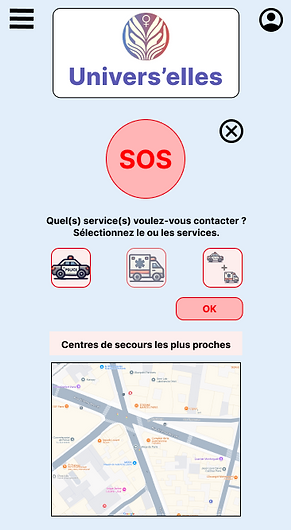
We took user feedback into account and modified the “Police and Ambulance” button design, and changed the
“Validate” button to “OK.” This made the user flow simpler and easier to understand.
Before the usability study

After the usability study
Mockups
Here are the mockups for the main user flow of the smartphone version.


Key Mockups
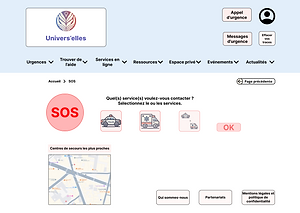
Key Web Mockups: Here are the mockups for the main user flow of the website version.




High-fidelity prototype of the application
Here is the link to the high-fidelity prototype. It only includes the main user flow!

High-fidelity prototype of the website
Here is the link to the high-fidelity prototype. It only includes the main user flow!

Accessibility Considerations
1
2
3
We paid close attention to
typography. The font classification
is sans-serif, which helps improve
readability for people with reading
difficulties, such as those with
dyslexia.
We also carefully considered both
the typeface and the font style
choices.
The colors of texts, backgrounds,
buttons, and other elements were
carefully selected to create stronger
emphasis, improving visibility for
users with visual impairments and
helping to facilitate a smoother user
flow.
The chosen hierarchy will
ultimately allow the use of
accessibility tools such as TalkBack,
which will be beneficial for users
with visual impairments.
Responsive Design
-
Information Architecture
-
Responsive Layout Design
Site Map
This was the first version of the site map. It has evolved slightly since then.

Responsive Layouts
The designs for different screen sizes include mobile, tablet, and desktop. While smartphone and tablet versions remain similar, the desktop version highlights more options.
Mobile site

Tablet

Desktop

Going Forward
-
Key Takeaways
-
Next Steps
Key Takeaways

Impact:
The design aims to meet user needs, in its current form, it fulfills the need to call for help in case of danger.
Peer feedback excerpt: "The app allows users to call for help discreetly. It could literally save lives. "

What I Learned:
While designing this app and website, I learned that research, usability testing, and design critique sessions help challenge biases, broaden perspective, and continuously improve design through iterations.
Next Steps
1
Develop other sections and user flows of the app and website.
2
Improve accessibility for users with disabilities.
3
Conduct another round of usability testing to further develop and enhance the app and website.
Thank you for reading.
Univers’elles marks an important step in my development as a UX designer.
This third project enabled me to refine my ability to structure a complete experience while strengthening my strategic thinking and design decisions.
Today, I approach each project with a broader, more structured, and more demanding perspective.


